#1 · Best mouse
Logitech MX Master 3S Wireless Mouse

4.8Our score
Sculpted for comfort, whisper-quiet clicks and a scroll wheel that flies through long documents. Works across multiple computers.
- Quiet clicks
- Fast scroll
- Works on glass
- Multi-device

A comfortable desk setup doesn't require a big budget. Start with these essentials for your back, your eyes and your focus.
The buyurself team · Updated September 24, 2026
We independently choose everything we recommend. If you buy through our links we may earn a commission, at no extra cost to you. Learn more
Our picks at a glance
| Pick | Product | Best for | Our score |
|---|---|---|---|
| #1Best mouse | Logitech MX Master 3S Wireless Mouse | Best mouse for productivity | 4.8/5 |
| #2Best budget combo | Logitech MK270 Wireless Keyboard & Mouse | Best budget desk setup | 4.5/5 |
| #3Best webcam | Logitech C920x HD Pro Webcam | Best webcam for video calls | 4.6/5 |
If you work from home even a few days a week, small changes to your setup add up to real comfort. Start with the things you touch all day, your chair, mouse and keyboard, then fix your lighting and screen height.
#1 · Best mouse
Sculpted for comfort, whisper-quiet clicks and a scroll wheel that flies through long documents. Works across multiple computers.
#2 · Best budget combo

A reliable wireless keyboard and mouse for the price of lunch. Perfect for turning a laptop into a desk setup.
#3 · Best webcam
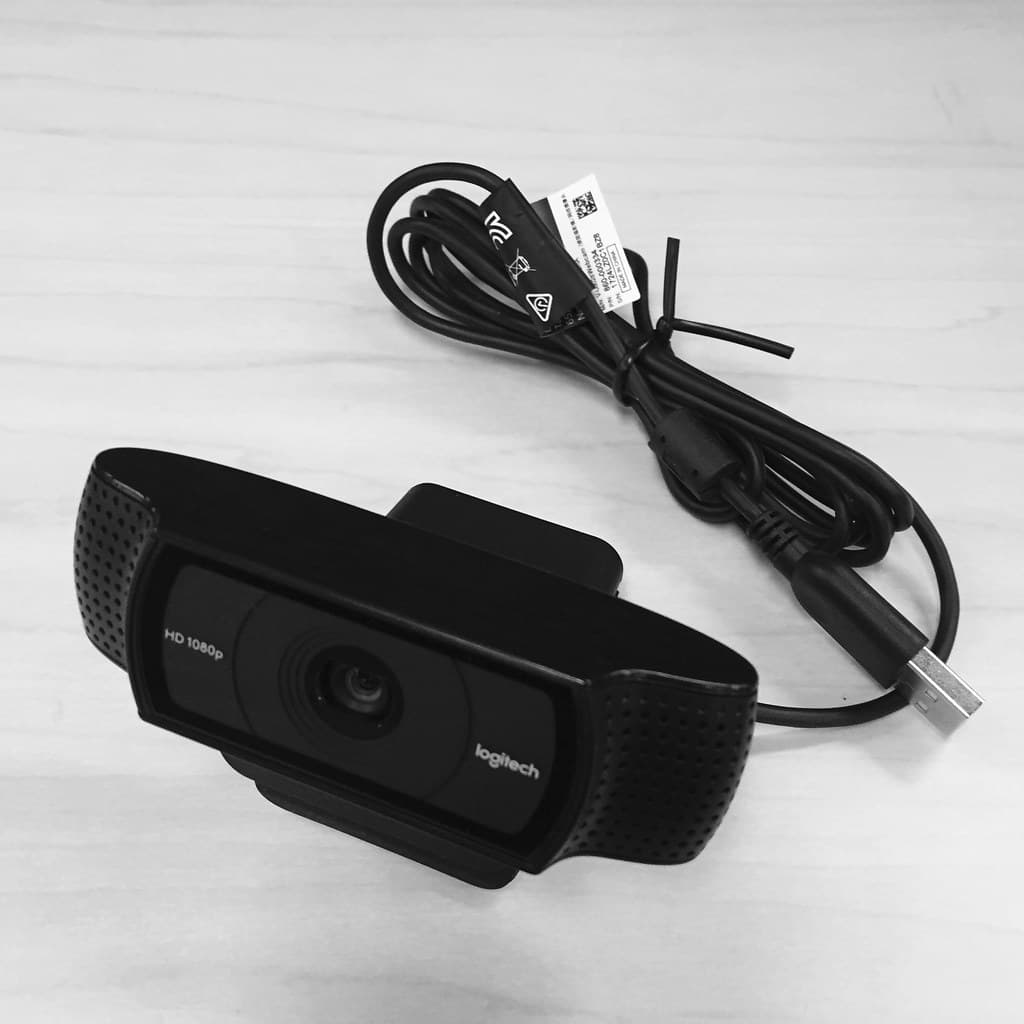
Sharp, well-lit video for calls, far better than most built-in laptop cameras.
If you use a laptop all day, raising it and adding a separate keyboard and mouse is the single cheapest way to improve your posture.
We may earn a small commission from qualifying purchases. Learn more